 admin
7ea20554a6
admin
7ea20554a6
- Created Librewolf configuration in `home/programs/librewolf/system.nix` with telemetry disabled, enhanced security settings, and enforced extensions.
- Added Zen browser configuration in `home/programs/zen/default.nix` and `home/programs/zen/system.nix`, including similar privacy policies and default search engine settings.
- Introduced `hosts/home-pc/configuration.nix` for system-wide settings, including USBGuard rules and firewall configurations.
- Established `hosts/home-pc/flake.nix` to manage NixOS modules and configurations.
- Generated `hosts/home-pc/hardware-configuration.nix` for hardware-specific settings.
- Created `hosts/home-pc/home.nix` to import various user-specific applications and settings.
- Added profile picture in `hosts/home-pc/profile_picture.jpg`.
- Implemented secrets management in `hosts/home-pc/secrets/default.nix` and `hosts/home-pc/secrets/secrets.yaml` using SOPS for encryption.
- Defined user-specific variables in `hosts/home-pc/variables.nix`, including hostname, username, and locale settings.
- Added profile picture for laptop in `hosts/laptop/profile_picture.jpg`.
788 lines
25 KiB
Markdown
788 lines
25 KiB
Markdown
# Nixy Pro Configuration Guide
|
|
|
|
Nixy Pro is a **modular, comprehensive NixOS configuration** that unifies system management across multiple hosts with consistent theming, security, and automation. This repository provides:
|
|
|
|
- **🖥️ Multi-host management** (laptop, workstation, server)
|
|
- **⚙️ Hardware-specific configurations** (AMD/Nvidia graphics, Bluetooth, audio)
|
|
- **👥 User-level management** via home-manager with predefined user groups
|
|
- **🔒 Secure defaults** (USBGuard, sudo restrictions, authentication)
|
|
- **🌈 Consistent theming** with Stylix and Base16
|
|
- **📦 Package management** with curated software groups
|
|
- **🐳 Container support** with Docker integration
|
|
- **⌨️ Unified input methods** with Fcitx5
|
|
- **🎮 Wayland ecosystem** with Hyprland and tuigreet display manager
|
|
|
|
---
|
|
|
|
## 📋 Table of Contents
|
|
|
|
- [🏠 Project Architecture](#-project-architecture)
|
|
- [⚙️ System Configuration Modules](#-system-configuration-modules)
|
|
- [👥 User Groups & Package Groups](#-user-groups--package-groups)
|
|
- [🖥️ Host Configurations](#-host-configurations)
|
|
- [🌐 Self-Hosted Services](#-self-hosted-services)
|
|
- [🎨 Theming System](#-theming-system)
|
|
- [🛠️ Installation Guide](#%EF%B8%8F-installation-guide)
|
|
- [🔧 Usage & Maintenance](#-usage--maintenance)
|
|
- [💡 Troubleshooting](#-troubleshooting)
|
|
- [📚 Further Reading](#-further-reading)
|
|
|
|
---
|
|
|
|
## 🏠 Project Architecture
|
|
|
|
Nixy Pro follows a **multi-layer modular architecture**:
|
|
|
|
```
|
|
.
|
|
├── flake.nix # Main flake outputs and inputs
|
|
├── README.md # This file
|
|
├── LICENSE # MIT License
|
|
├── hosts/ # Host-specific configurations
|
|
│ ├── laptop/ # Laptop configuration
|
|
│ ├── home-pc/ # Home workstation configuration
|
|
│ ├── work/ # Work computer configuration
|
|
│ └── server/ # Self-hosted server configuration
|
|
├── home/ # User-level configurations
|
|
│ ├── programs/ # Home-manager programs and modules
|
|
│ │ ├── group/ # Package groups (dev, cybersecurity)
|
|
│ │ ├── nvf/ # Neovim configuration (nvf)
|
|
│ │ ├── shell/ # Shell utilities and configuration
|
|
│ │ └── ...
|
|
│ └── system/ # System-level user settings
|
|
│ ├── caeblestia-shell/ # Caelestia shell theme
|
|
│ └── ...
|
|
├── nixos/ # Core system configuration modules
|
|
│ ├── amd-graphics.nix # AMD GPU configuration
|
|
│ ├── audio.nix # PipeWire audio server setup
|
|
│ ├── bluetooth.nix # Bluetooth hardware support
|
|
│ ├── docker.nix # Docker container runtime
|
|
│ ├── fonts.nix # Font management (30+ fonts)
|
|
│ ├── hyprland.nix # Hyprland Wayland compositor
|
|
│ ├── nix.nix # Nix package manager configuration
|
|
│ ├── nvidia.nix # Nvidia GPU configuration with Wayland
|
|
│ ├── omen.nix # HP Omen laptop RGB control
|
|
│ ├── systemd-boot.nix # systemd-boot loader configuration
|
|
│ ├── tuigreet.nix # Tuigreet display manager
|
|
│ ├── usbguard.nix # USB device authorization
|
|
│ ├── users.nix # User and group definitions
|
|
│ └── utils.nix # Utility services and configurations
|
|
├── server-modules/ # Server-specific NixOS modules
|
|
│ ├── adguardhome.nix # DNS ad-blocker
|
|
│ ├── arr.nix # Media management stack
|
|
│ ├── cloudflared.nix # Cloudflare tunnel
|
|
│ ├── cyberchef.nix # Cyber Swiss Army Knife
|
|
│ ├── fail2ban.nix # Security: brute force prevention
|
|
│ ├── glance/ # System dashboard
|
|
│ ├── mealie.nix # Recipe manager
|
|
│ ├── ssh.nix # SSH server configuration
|
|
│ └── ...
|
|
├── themes/ # Visual theme configurations
|
|
└── docs/ # Documentation directory
|
|
```
|
|
|
|
### Architecture Layers
|
|
|
|
| Layer | Description | Example |
|
|
|-------|-------------|---------|
|
|
| **flake.nix** | Defines all flake outputs and inputs | Hyprland, Stylix, SOPS |
|
|
| **/nixos** | Core system-level NixOS modules | GPU, audio, bluetooth |
|
|
| **/home** | User-level configurations via home-manager | Terminals, shell, editors |
|
|
| **/hosts** | Host-specific configurations | laptop, workstation, server |
|
|
| **/server-modules** | Server services and network infrastructure | AdGuard, Glance, CyberChef |
|
|
| **/themes** | Theme definitions and color schemes | Rose-pine, sorbet, catppuccin |
|
|
|
|
---
|
|
|
|
## ⚙️ System Configuration Modules
|
|
|
|
### Core System Modules
|
|
|
|
#### 1. Nix Package Manager (`nixos/nix.nix`)
|
|
|
|
**Purpose:** Centralized Nix configuration across all hosts
|
|
|
|
**Key Features:**
|
|
- **Unfree packages enabled** (required for Nvidia drivers)
|
|
- **Cachix mirrors configured:**
|
|
- `https://hyprland.cachix.org` (Hyprland packages)
|
|
- `https://nix-community.cachix.org` (Community packages)
|
|
- `https://numtide.cachix.org` (Numtide packages)
|
|
- `https://cuda-maintainers.cachix.org` (CUDA packages)
|
|
- **Experimental features:** `nix-command` and `flakes` enabled
|
|
- **Automatic garbage collection:** Weekly cleanup, 7-day threshold
|
|
- **Sudo configuration:**
|
|
- Passwordless sudo for `nixos-rebuild` command
|
|
- Timestamp timeout set to -1 (passwordless during SSH sessions)
|
|
- **Download optimization:** 250 MB buffer size for faster installations
|
|
|
|
#### 2. Systemd Boot Loader (`nixos/systemd-boot.nix`)
|
|
|
|
**Purpose:** UEFI boot management with silent/ Plymouth-capable boot
|
|
|
|
**Configuration:**
|
|
- **Bootloader:** systemd-boot (supports 8 entries)
|
|
- **Kernel parameters for silent boot:**
|
|
- `quiet` - Minimize console output
|
|
- `splash` - Show boot splash screen
|
|
- `rd.systemd.show_status=false` - Hide systemd status
|
|
- `udev.log_priority=3` - Reduced logging level
|
|
- **Kernel:** `linuxPackages_latest` for cutting-edge hardware support
|
|
- **Cleanup:** Temporary files cleared on boot
|
|
|
|
#### 3. Users & Authentication (`nixos/users.nix`)
|
|
|
|
**Purpose:** User account management and permissions
|
|
|
|
**Configuration:**
|
|
- **Default shell:** Zsh (configured via home-manager)
|
|
- **User groups:**
|
|
- `wheel` - Sudo privileges
|
|
- `networkmanager` - Network control
|
|
- **Multi-machine support:** Variables replace hardcoded usernames
|
|
- **Zsh autocompletion:** System packages available in shell
|
|
|
|
### Hardware & Peripherals
|
|
|
|
#### 4. Graphics Configuration (Choose one based on hardware)
|
|
|
|
**Option A: AMD Graphics (`nixos/amd-graphics.nix`)**
|
|
|
|
**Purpose:** Enable AMD GPU acceleration with VA-API support
|
|
|
|
**Features:**
|
|
- **ROCm support:** `rocmPackages.clr.icd` for compute workloads
|
|
- **VA-API acceleration:** Hardware video decoding
|
|
- `libvdpau-va-gl` - VDPAU driver with VA-GL backend
|
|
- `libva-vdpau-driver` - VA-API to VDPAU bridge
|
|
- **OpenGL acceleration:** Mesa packages for 2D/3D acceleration
|
|
|
|
**Option B: Nvidia Graphics (`nixos/nvidia.nix`)**
|
|
|
|
**Purpose:** Proprietary Nvidia driver setup for optimal performance
|
|
|
|
**Hardware Support:**
|
|
- **Wayland compatibility:** `nvidia-drm.modeset=1` for direct rendering
|
|
- **Hybrid graphics:** Prime offloading for laptops with multiple GPUs
|
|
- **Graphics features:** G-Sync, VRR, GPU-accelerated Electron apps
|
|
- **API support:** Vulkan, VA-API, GLX, OpenGL
|
|
|
|
**Environment Configuration:**
|
|
```bash
|
|
LIBVA_DRIVER_NAME=nvidia # VA-API acceleration
|
|
GBM_BACKEND=nvidia-drm # Graphics backend
|
|
__GLX_VENDOR_LIBRARY_NAME=nvidia # OpenGL acceleration
|
|
NIXOS_OZONE_WL=1 # Electron Wayland support
|
|
__GL_GSYNC_ALLOWED=1 # G-Sync support
|
|
__GL_VRR_ALLOWED=1 # Variable Refresh Rate
|
|
MOZ_ENABLE_WAYLAND=1 # Firefox Wayland
|
|
NVD_BACKEND=direct # New driver backend
|
|
```
|
|
|
|
**BLACKLISTED MODULES:** `nouveau` to prevent driver conflicts
|
|
|
|
#### 5. Audio System (`nixos/audio.nix`)
|
|
|
|
**Purpose:** Modern audio daemon stack with hardware acceleration
|
|
|
|
**Configuration:**
|
|
- **PipeWire** enabled as default audio server (replaces PulseAudio)
|
|
- **WirePlumber** for session and policy management
|
|
- **Alsa** backend with 32-bit application support
|
|
- **JACK** compatibility layer for professional audio tools
|
|
- **Camera monitoring disabled** for privacy
|
|
- **Real-time scheduling:** `rtkit` for performance
|
|
|
|
#### 6. Bluetooth (`nixos/bluetooth.nix`)
|
|
|
|
**Purpose:** Bluetooth hardware support with persistent power state
|
|
|
|
**Configuration:**
|
|
- **Bluetooth hardware:** Enabled and powered on at boot
|
|
- **Standard profiles:** A2DP, HFP, HID, etc.
|
|
|
|
#### 7. USBGuard (`nixos/usbguard.nix`)
|
|
|
|
**Purpose:** USB device authorization framework for security
|
|
|
|
**Configuration:**
|
|
- **Default policy:** Block implicit (unknown) USB devices
|
|
- **IPC access:** Allowed for root and configured user
|
|
- **Security layer:** Prevents unauthorized USB devices from mounting
|
|
|
|
#### 8. HP Omen Laptop Support (`nixos/omen.nix`)
|
|
|
|
**Purpose:** Specialized configuration for HP Omen gaming laptops
|
|
|
|
**Features:**
|
|
- **RGB control:** Kernel module `hp-wmi` for custom lighting
|
|
- **RGB zones:** 4 zones with custom access (`/sys/devices/platform/hp-wmi/rgb_zones/zoneXX`)
|
|
- **User group:** `omen-rgb` for RGB management permissions
|
|
- **Sysfs permissions:** Set via tmpfiles rules and udev rules
|
|
- **Kernel command line:** `hp_wmi.force_slow_fan_control=1` for battery-friendly fan control
|
|
|
|
---
|
|
|
|
## 👥 User Groups & Package Groups
|
|
|
|
### Predefined Software Groups
|
|
|
|
Nixy Pro includes **two main package groups** for quick environment setup:
|
|
|
|
#### 🔬 Cybersecurity Group
|
|
|
|
**Purpose:** Security research, penetration testing, and digital forensics
|
|
|
|
**Package Categories:**
|
|
- **Web:** dirb, ffuf, katana, whatweb
|
|
- **Hashes & Cracking:** hashcat, haiti, hydra, john
|
|
- **Databases:** mariadb, redis, sqlmap, nosqli
|
|
- **Network:** inetutils, termshark (TUI Wireshark), dnsrecon, whois, dig, nmap, samba
|
|
- **Exploitation:** metasploit, nuclei
|
|
- **VPN:** openvpn
|
|
- **Secrets:** trufflehog
|
|
- **Forensics:** binwalk
|
|
- **Additional:** spilltea, jwt-tui (from NUR package collection)
|
|
|
|
**Quick Install (without full system setup):**
|
|
```bash
|
|
nix shell github:anotherhadi/nixy#cybersecurity
|
|
```
|
|
|
|
**Packages Available:** 22+ security tools curated for penetration testing and security research
|
|
|
|
---
|
|
|
|
#### 💻 Development Group
|
|
|
|
**Purpose:** Development environment with essential tools
|
|
|
|
**Package Categories:**
|
|
- **Languages:** Go, Node.js, Python 3
|
|
- **Build Tools:** gcc, jq, rsync
|
|
- **Development Utilities:** air (Go live reload), duckdb (SQLite-compatible DB), nix-prefetch-github
|
|
- **Editors:** claude-code (CLI for Claude), bash tools
|
|
|
|
**Quick Install (without full system setup):**
|
|
```bash
|
|
nix shell github:anotherhadi/nixy#dev
|
|
```
|
|
|
|
**Packages Available:** 9+ essential development tools
|
|
|
|
---
|
|
|
|
### Home-manager User Groups
|
|
|
|
Users automatically receive:
|
|
- **NetworkManager** integration (GUI network configuration)
|
|
- **Sudo access** (passwordless for wheel group)
|
|
- **Zsh shell** with completions
|
|
- **Caelestia-shell** (Hyprland-compatible desktop environment)
|
|
- **Input method:** Fcitx5 for international keyboard layouts
|
|
- **XDG compliance** with proper directory structure
|
|
|
|
---
|
|
|
|
## 🖥️ Host Configurations
|
|
|
|
### Supported Host Types
|
|
|
|
Nixy Pro manages **four distinct host configurations**:
|
|
|
|
| Host | Type | Hardware Profile | Network Configuration |
|
|
|------|------|----------------|---------------------|
|
|
| `h-laptop` | Personal laptop | AMD/Nvidia GPU | NetworkManager, mobile broadband |
|
|
| `h-work` | Work computer | Unknown (configurable) | NetworkManager, VPN |
|
|
| `jack` | Self-hosted server | Server-grade hardware | Static IP, Cloudflare Tunnel |
|
|
|
|
### Host Configuration Structure
|
|
|
|
Each host includes:
|
|
|
|
```
|
|
hosts/<hostname>/
|
|
├── flake.nix # Host-specific flake
|
|
├── configuration.nix # System configuration imports
|
|
├── hardware-configuration.nix # Auto-generated hardware config
|
|
├── variables.nix # Host-specific variables
|
|
├── variables.secret # Encrypted secrets (via SOPS-nix)
|
|
└── secrets/ # Unencrypted secrets if not using SOPS
|
|
```
|
|
|
|
**Example configuration.nix:**
|
|
```nix
|
|
{
|
|
imports = [
|
|
# Core system modules
|
|
../../nixos/nix.nix
|
|
../../nixos/systemd-boot.nix
|
|
../../nixos/users.nix
|
|
../../nixos/utils.nix
|
|
../../nixos/audio.nix
|
|
../../nixos/bluetooth.nix
|
|
../../nixos/docker.nix
|
|
../../nixos/amd-graphics.nix # or nvidia.nix
|
|
../../nixos/fonts.nix
|
|
../../nixos/hyprland.nix
|
|
../../nixos/tuigreet.nix
|
|
../../nixos/usbguard.nix
|
|
];
|
|
|
|
# Host-specific variables
|
|
cfg = import ./variables.nix { inherit inputs pkgs; };
|
|
}
|
|
```
|
|
|
|
### Variable System
|
|
|
|
All hosts use **centralized variables** defined in `variables.nix`:
|
|
|
|
```nix
|
|
{
|
|
hostname = "laptop"; # Machine hostname
|
|
username = "hadi"; # Main user account
|
|
keyboardLayout = "us,de"; # Keyboard layouts
|
|
timeZone = "Europe/Berlin"; # System timezone
|
|
defaultLocale = "en_US.UTF-8"; # Primary locale
|
|
extraLocale = "de_DE.UTF-8"; # Secondary locale
|
|
autoGarbageCollector = true; # Nix garbage collection enabled
|
|
autoUpgrade = true; # Auto-update enabled
|
|
configDirectory = "/etc/nixos"; # Config location
|
|
flake = "/etc/nixos"; # Flake path
|
|
}
|
|
```
|
|
|
|
---
|
|
|
|
## 🌐 Self-Hosted Services
|
|
|
|
The server configuration (`hosts/server/`) includes **modular service definitions** for:
|
|
|
|
### 🔧 Server Architecture
|
|
|
|
**Cloudflare Tunnel** as the secure gateway with:
|
|
- **Zero public IP exposure** - Only accessible via Cloudflare
|
|
- **Access control** via Cloudflare's Zero Trust policies
|
|
- **Custom domain support** for easy access
|
|
|
|
### 📦 Services Modules
|
|
|
|
| Module | Purpose | Technology |
|
|
|--------|---------|------------|
|
|
| `adguardhome.nix` | Network-wide ad blocking and DNS filtering | AdGuard Home |
|
|
| `arr.nix` | Media management stack (movies/TV shows automation) | Radarr, Sonarr, etc. |
|
|
| `cyberchef.nix` | Cyber Swiss Army Knife for data manipulation | Node.js web app |
|
|
| `fail2ban.nix` | Security: brute force prevention | Fail2Ban |
|
|
| `firewall.nix` | Network filtering and protection | systemd, nftables |
|
|
| `glance/` | System monitoring dashboard | Glance |
|
|
| `mealie.nix` | Self-hosted meal planning and recipe management | Mealie |
|
|
| `stirling-pdf.nix` | Web-based PDF editor and converter | Node.js |
|
|
| `ssh.nix` | Secure remote access | OpenSSH |
|
|
|
|
### 🌐 High-Priority Services
|
|
|
|
1. **NGINX** - Reverse proxy routing traffic to services
|
|
2. **AdGuard Home** - Block ads/trackers at DNS level
|
|
3. **Glance** - System monitoring dashboard
|
|
4. **Arr Stack** - Automated media management (Radarr, Sonarr, etc.)
|
|
5. **Mealie** - Recipe manager for meal planning
|
|
6. **Stirling-PDF** - Client-side PDF editing/manipulation
|
|
7. **CyberChef** - Encryption, encoding, and data analysis
|
|
8. **Mazanoke** - Image processing and optimization
|
|
9. **Cloudflared** - Secure tunnel via Cloudflare
|
|
10. **Fail2Ban** - Intrusion prevention and brute force blocking
|
|
|
|
### 📊 Security Features
|
|
|
|
- **Cloudflared:** Encrypted tunnel with authentication
|
|
- **Fail2Ban:** IP blocking after failed login attempts
|
|
- **Firewall:** nftables-based filtering
|
|
- **Port forwarding:** Only essential ports exposed via reverse proxy
|
|
- **Timed access:** Scheduled firewall rules
|
|
- **Network isolation:** Docker networks isolated
|
|
|
|
---
|
|
|
|
## 🎨 Theming System
|
|
|
|
### Stylix Integration
|
|
|
|
Nixy Pro uses **[Stylix](https://stylix.danth.me/)** for consistent theming across:
|
|
- **Hyprland** (WM colors)
|
|
- **Terminal emulators**
|
|
- **GTK applications**
|
|
- **Rofi/Waybar/menu styling**
|
|
- **Shell prompts**
|
|
|
|
### Available Themes
|
|
|
|
See **[THEMES.md](docs/THEMES.md)** for theme configurations and screenshots.
|
|
|
|
### Theme Gallery Examples
|
|
|
|
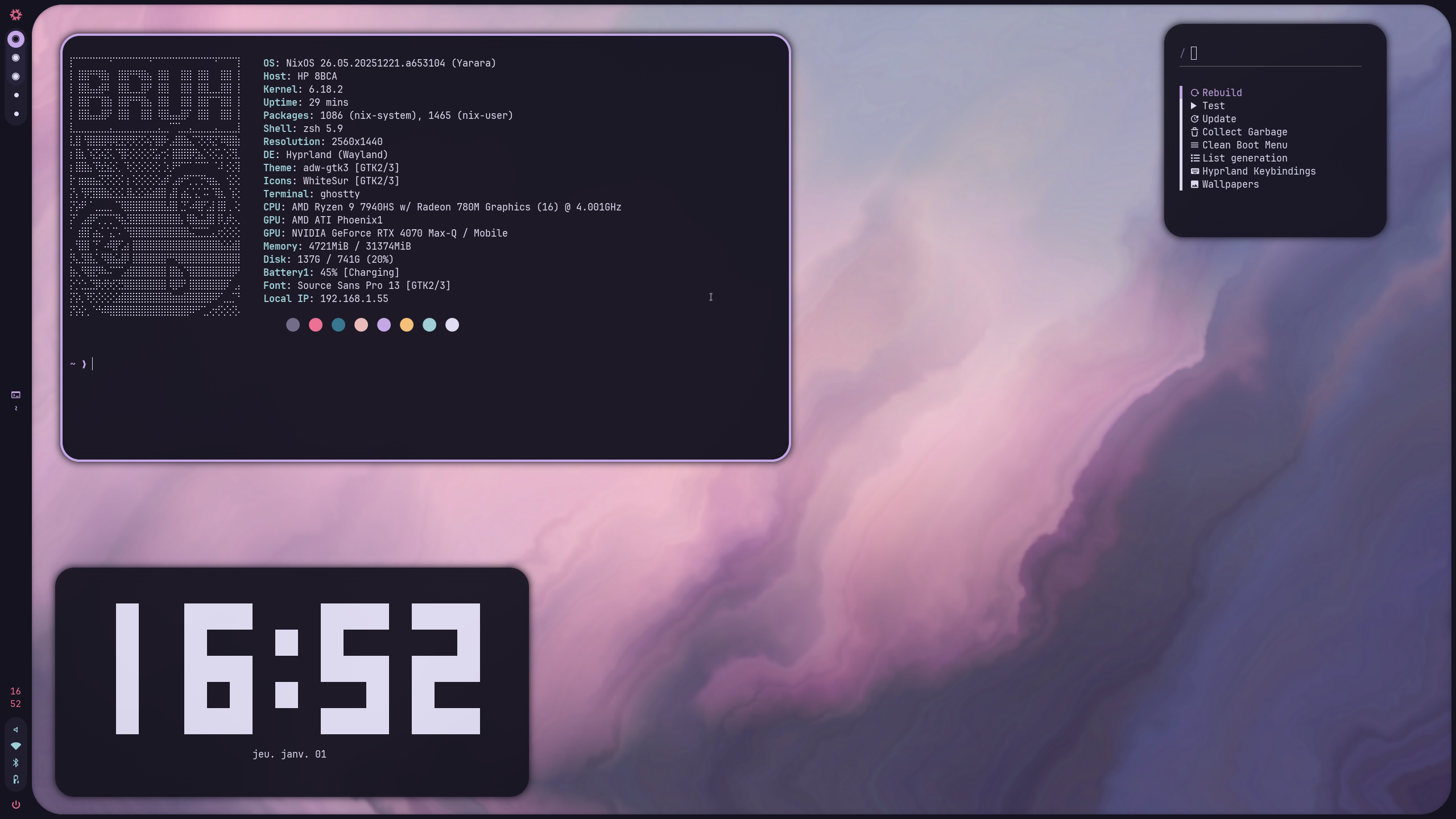
|
|
*Rose-pine theme showcasing consistent color scheme across applications*
|
|
|
|
---
|
|
|
|
## ⚙️ Service Configuration Layer
|
|
|
|
### Essential System Services
|
|
|
|
| Service | Purpose | Configuration File |
|
|
|---------|---------|------------------|
|
|
| **NetworkManager** | Network configuration GUI | `utils.nix` |
|
|
| **dbus-broker** | Desktop Bus implementation | `utils.nix` |
|
|
| **GNOME Keyring** | Password storage | `utils.nix` |
|
|
| **UDisks2** | Removable media management | `utils.nix` |
|
|
| **Upower** | Battery monitoring | `utils.nix` |
|
|
| **Power Profiles Daemon** | Power management profiles | `utils.nix` |
|
|
| **GVFS** | Virtual file system support | `utils.nix` |
|
|
| **libinput** | Touchpad/trackpoint input | `utils.nix` |
|
|
| **dconf** | Desktop configuration storage | `utils.nix` |
|
|
| **Greetd + Tuigreet** | Display manager | `tuigreet.nix` |
|
|
| **XDG Portal** | File picker and portal integration | `utils.nix` |
|
|
|
|
### Font Management
|
|
|
|
**30+ fonts installed** including:
|
|
- **Sans-serif:** Roboto, Work Sans, Source Sans, Comfortaa, Inter, Jost, Lexend
|
|
- **Serif:** Comic Neue
|
|
- **Monospace:** Fira Code (Nerd Font), Meslo LG (Nerd Font)
|
|
- **Default:** DejaVu, Noto (including CJK and color emoji)
|
|
- **Special:** OpenMoji, Twemoji
|
|
|
|
**Note:** Default font packages disabled to allow user selection via home-manager
|
|
|
|
---
|
|
|
|
## 🛠️ Installation Guide
|
|
|
|
### Prerequisites
|
|
|
|
1. **NixOS System** (latest stable or unstable)
|
|
2. **Git** and **sudo** access
|
|
3. **Internet connection** for package downloads
|
|
4. **Disk space:** Minimum 30GB recommended for full installation
|
|
5. **UEFI system** (systemd-boot requirement)
|
|
|
|
### Installation Steps
|
|
|
|
#### Step 1: Clone the Repository
|
|
|
|
```bash
|
|
# Recommended location for NixOS configurations
|
|
git clone https://gitea.doomlabs.de/KptltD00M/nixy.git /etc/nixos
|
|
cd /etc/nixos
|
|
```
|
|
|
|
#### Step 2: Copy Appropriate Host Configuration
|
|
|
|
```bash
|
|
# Choose your hardware profile:
|
|
# - Laptop (AMD/Nvidia)
|
|
# - Home workstation
|
|
# - Work computer
|
|
# - Server
|
|
|
|
# For example, if setting up a laptop:
|
|
cp -r hosts/laptop hosts/$(hostname)
|
|
|
|
# Navigate to new host configuration
|
|
cd hosts/$(hostname)
|
|
```
|
|
|
|
#### Step 3: Configure Host-Specific Variables
|
|
|
|
```bash
|
|
# Edit host variables
|
|
nano variables.nix
|
|
```
|
|
|
|
**Change `CHANGEME` values:**
|
|
- `hostname`
|
|
- `username`
|
|
- `keyboardLayout`
|
|
- `timeZone`
|
|
- `defaultLocale`
|
|
|
|
#### Step 4: Set Up Secrets
|
|
|
|
```bash
|
|
# Either:
|
|
# Option A: Use SOPS-nix for encrypted secrets (recommended)
|
|
pdo export secrets/ > secrets/secrets.yaml.age
|
|
../../bin/update-secrets
|
|
|
|
# Option B: Manual secrets
|
|
# Copy secrets template if needed
|
|
cp -r hosts/laptop/secrets hosts/$(hostname)/secrets
|
|
```
|
|
|
|
#### Step 5: Review and Apply Configuration
|
|
|
|
1. **Check for CHANGEME comments:**
|
|
```bash
|
|
# Quick scan for required changes
|
|
rg "CHANGEME" /etc/nixos
|
|
```
|
|
|
|
2. **Verify hardware configuration:**
|
|
```bash
|
|
# Import appropriate GPU module in configuration.nix
|
|
# - AMD: ../../nixos/amd-graphics.nix
|
|
# - Nvidia: ../../nixos/nvidia.nix
|
|
# - HP Omen: ../../nixos/omen.nix
|
|
```
|
|
|
|
3. **Apply configuration:**
|
|
```bash
|
|
# Dry run first
|
|
sudo nixos-rebuild dry-activate --flake .#$(hostname)
|
|
|
|
# Apply
|
|
sudo nixos-rebuild switch --flake .#$(hostname)
|
|
```
|
|
|
|
#### Step 6: Home-manager Setup
|
|
|
|
```bash
|
|
# Update home-manager configuration
|
|
home-manager switch --flake /etc/nixos#$(username)@$(hostname)
|
|
|
|
# Optional: Generate hardware configuration if rebuilding from scratch
|
|
sudo nixos-generate-config --root /mnt
|
|
```
|
|
|
|
---
|
|
|
|
## 🔧 Usage & Maintenance
|
|
|
|
### Daily Commands
|
|
|
|
| Command | Purpose |
|
|
|---------|---------|
|
|
| `sudo nixos-rebuild switch --flake .#laptop` | Rebuild and apply system changes |
|
|
| `home-manager switch --flake .#hadi@laptop` | Update home-manager configuration |
|
|
| `sudo nixos-rebuild boot --flake .#laptop` | Set new generation as default boot |
|
|
| `nix flake update` | Update flake inputs |
|
|
| `sudo nixos-rebuild switch --upgrade` | Update system and packages |
|
|
| `nix store gc` | Cleanup unused packages |
|
|
| `nix profile list` | List installed packages |
|
|
| `nix profile wipe-history` | Remove old package versions |
|
|
|
|
### Flake Update Process
|
|
|
|
```bash
|
|
# Update all flake inputs
|
|
nix flake update
|
|
|
|
# Rebuild all systems
|
|
for host in h-laptop h-work jack; do
|
|
sudo nixos-rebuild switch --flake .#$host
|
|
done
|
|
|
|
# Update home-manager
|
|
for host in h-laptop h-work jack; do
|
|
home-manager switch --flake .#username@$host
|
|
done
|
|
```
|
|
|
|
### System Updates
|
|
|
|
**Automatic Updates Enabled:**
|
|
```nix
|
|
system.autoUpgrade = {
|
|
enable = true; # System updates
|
|
dates = "04:00"; # Daily at 4 AM
|
|
flake = config.var.configDir; # Self-update
|
|
flags = ["--update-input" "nixpkgs"];
|
|
allowReboot = false; # Manual reboot required
|
|
};
|
|
```
|
|
|
|
**Recommendation:** Check system status weekly:
|
|
```bash
|
|
systemctl status --user wireplumber pulseaudio-esd autostart-vpn
|
|
journalctl --vacuum-time=7d
|
|
```
|
|
|
|
---
|
|
|
|
## 💡 Troubleshooting
|
|
|
|
### Common Issues & Solutions
|
|
|
|
#### ❌ Audio not working
|
|
|
|
**Diagnosis:**
|
|
- PipeWire service status
|
|
- WirePlumber activity
|
|
- Audio device detection
|
|
|
|
**Solutions:**
|
|
```bash
|
|
# Check PipeWire status
|
|
systemctl --user status wireplumber pulseaudio-esd
|
|
|
|
# Verify audio devices
|
|
pw-cli list-objects | grep -i audio
|
|
|
|
# Restart audio services
|
|
systemctl --user restart wireplumber
|
|
```
|
|
|
|
---
|
|
|
|
#### ❌ Hyprland fails to start
|
|
|
|
**Symptoms:**
|
|
- Black screen after login
|
|
- Wayland session crash
|
|
- Missing display manager
|
|
|
|
**Diagnosis:**
|
|
- XDG_RUNTIME_DIR environment
|
|
- PipeWire running
|
|
- Required files present
|
|
|
|
**Solutions:**
|
|
```bash
|
|
# Check environment
|
|
echo $XDG_RUNTIME_DIR
|
|
whoami # Should be logged-in user
|
|
|
|
# Verify services
|
|
systemctl --way status
|
|
ls /run/current-system/sw/share/wayland-sessions/
|
|
```
|
|
|
|
**Manual start:**
|
|
```bash
|
|
$XDG_RUNTIME_DIR=/run/user/$(id -u) Hyprland
|
|
```
|
|
|
|
---
|
|
|
|
#### ❌ Nvidia drivers not loading
|
|
|
|
**Diagnostics:**
|
|
- Kernel parameters check
|
|
- Secure boot status
|
|
- Driver conflicts
|
|
|
|
**Common fixes:**
|
|
```bash
|
|
# Check kernel parameters
|
|
cat /proc/cmdline | grep nvidia
|
|
|
|
# Verify module loading
|
|
lsmod | grep nvidia
|
|
|
|
# Blacklist nouveau (if not already done)
|
|
echo "blacklist nouveau" | sudo tee /etc/modprobe.d/blacklist-nouveau.conf
|
|
sudo update-initramfs -u -k all
|
|
```
|
|
|
|
**Secure boot workaround (if enabled):**
|
|
- Disable secure boot in BIOS
|
|
- Or sign Nvidia modules
|
|
|
|
---
|
|
|
|
#### ⚠️ Home-manager not applying changes
|
|
|
|
**Solutions:**
|
|
```bash
|
|
# Check home-manager configuration
|
|
home-manager build --flake /etc/nixos#username@hostname --show-trace
|
|
home-manager generations
|
|
|
|
# Force fresh rebuild
|
|
rm -rf ~/.local/share/nix/profiles/home-manager
|
|
home-manager switch --flake /etc/nixos#username@hostname
|
|
```
|
|
|
|
---
|
|
|
|
#### 🔄 USB devices blocked by USBGuard
|
|
|
|
**Diagnosis:**
|
|
- USBGuard service status
|
|
- Policy decisions
|
|
|
|
**Solutions:**
|
|
```bash
|
|
# Check USBGuard status
|
|
systemctl status usbguard
|
|
|
|
# List USB devices
|
|
lsusb
|
|
|
|
# Temporarily allow device
|
|
usbguard list-devices
|
|
usbguard allow-device <device-id>
|
|
```
|
|
|
|
**Configuration:** Edit `/etc/usbguard/rules.conf` for permanent changes
|
|
|
|
---
|
|
|
|
### System Recovery
|
|
|
|
**If system fails to boot:**
|
|
1. Reboot into recovery ISO
|
|
2. Remount root partition
|
|
3. Apply configuration:
|
|
```bash
|
|
sudo nixos-rebuild switch --flake /etc/nixos#hostname
|
|
```
|
|
|
|
**If home-manager breaks:**
|
|
```bash
|
|
# Reinstall from scratch
|
|
home-manager uninstall
|
|
home-manager switch --flake /etc/nixos#username@hostname
|
|
```
|
|
|
|
---
|
|
## 📚 Further Reading & Resources
|
|
|
|
### NixOS Documentation
|
|
- **[NixOS Manual](https://nixos.org/manual/nixos/stable/)** - Official NixOS documentation
|
|
- **[Nix Flakes Guide](https://nixos.wiki/wiki/Flakes)** - Flakes feature documentation
|
|
- **[Home Manager Manual](https://nix-community.github.io/home-manager/)** - User-level configuration
|
|
|
|
### Related Projects
|
|
- **[Hyprland](https://wiki.hyprland.org/)** - Wayland compositor
|
|
- **[Stylix](https://stylix.danth.me/)** - Theming system
|
|
- **[Caelestia Shell](https://github.com/caelestia-dots/shell)** - Desktop environment
|
|
- **[SOPS-nix](https://github.com/Mic92/sops-nix)** - Secret management
|
|
- **[Helium Browser](https://github.com/oxcl/nix-flake-helium-browser)** - Flutter-based browser
|
|
|
|
### Repository Documentation
|
|
- **[GROUPS.md](docs/GROUPS.md)** - Package groups (dev, cybersecurity) and how to use them
|
|
- **[SERVER.md](docs/SERVER.md)** - Server-specific service configurations
|
|
- **[NEOVIM.md](docs/NEOVIM.md)** - Neovim configuration (nvf)
|
|
- **[THEMES.md](docs/THEMES.md)** - Theme system and color schemes
|
|
- **[CONTRIBUTING.md](docs/CONTRIBUTING.md)** - Contribution guidelines
|
|
|
|
### Useful Commands Reference
|
|
```bash
|
|
# Show generation history
|
|
sudo nix-env --list-generations
|
|
|
|
# Switch to specific generation
|
|
sudo nixos-rebuild switch --flake .#laptop --profile /nix/var/nix/profiles/system-<generation>
|
|
|
|
# Rollback to previous generation
|
|
sudo nix-env --rollback
|
|
sudo nixos-rebuild switch
|
|
|
|
# Clean old generations (keep 5 latest)
|
|
sudo nix-collect-garbage -d
|
|
sudo nix-env --delete-generations old
|
|
```
|
|
|
|
--- |